Template Literals: Modern String Magic in JavaScript
Simplify concatenation, escaping, and multiline strings with ES6 template literals
Handling strings in a programming language in a day to day task that we all do during development. That's why it is important to know some nicks and crooks of string manipulation and creation in the programming language of your choice.
Today we are covering such a topic with JavaScript as our programming language. JavaScript is the language of the web and is being used for a very long time now. But dealing with the strings in javascript was nothing but a tedious task.
The old way of dealing with strings in javascript was very confusing and difficult to work with. For example,
const name = "John Doe";
const introduction = "Hello, my name is " + name + ".";
console.log(introduction);
// Hello, my name is John Doe.
As, you can see to concatenate multiple strings together we have to use "+" operator between them. But that is not the only problem, did you notice the extra space between first string and variable that is used. It is there because we have to keep the track of spaces between two joined strings manually, which was a separate concern.
One more problem with old way was using inverted commas inside the string. We have to use escaping character before the inverted comma to make javascript ignore it.
const pen = 'It is John\'s Pen';
const qoute = "John said, \"I was not there\"";
console.log(pen);
console.log(qoute);
// It is John's Pen
// John said, "I was not there"
To write the same inverted comma inside a string we have to use escaping character.
For multi-line strings, JavaScript does not provide any special support for them. To make a multi-line string we either have to use "/n" in between the string or use array join.
const str = "This is first line.\nThis is second line."
const str2 = [
    "First line",
    "Second line",
    "Third line"
].join("\n")
console.log(str);
console.log(str2);

// This is first line.
// This is second line.

// First line
// Second line
// Third line
Due to these problems handling strings in javascript was not an easy task earlier. Then, In 2015 a ES6 version of JavaScript came. With which came a new feature in javascript named "Template Literal".
Template Literal
ES6 version of javascript introduced a new way to define strings using backticks ( ` )
The first thing that they solved was usage of inverted commas inside strings.
const new_str = `Hello, I am Josh's brother.`;
console.log(new_str);
// Hello, I am Josh's brother.
Template literal also eliminates the requirement of using "\n" inside strings to form new lines. Since, it respects the new lines introduced withing itself and reflects them when printing.
const long_str = `This is first line
This is second line
This is third line`;
console.log(long_str);

// This is first line
// This is second line
// This is third line
String Interpolation
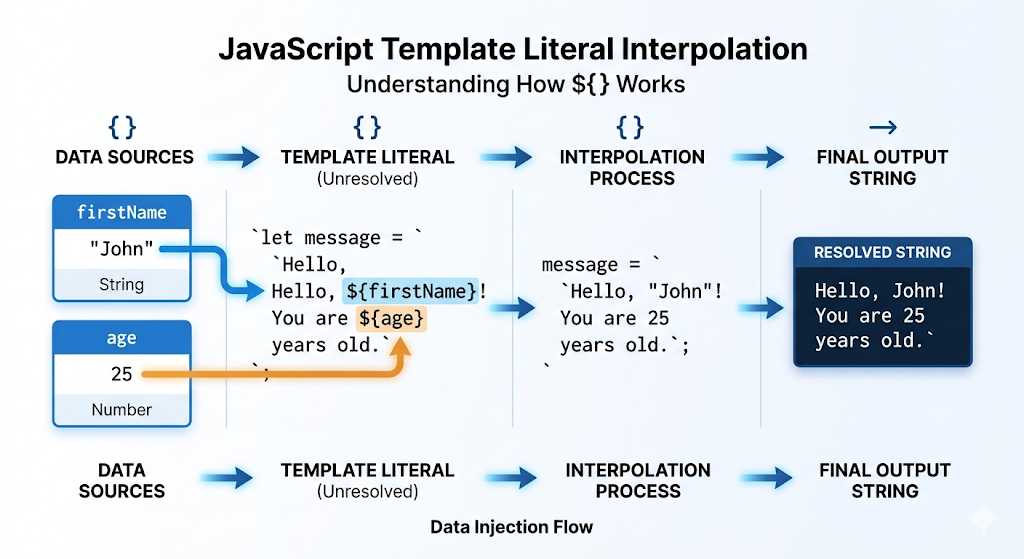
It also introduced a new feature named String Interpolation.
It means insertion of value of a variable in between a string without using "+" operator.
To use string interpolation there is a special syntax to tell the javascript where we are inserting a variable's value inside a string. It is "${}".
const name = "John Doe";
const intro = `Hello, My name is ${name}`;
console.log(intro);

// Hello, my name is John Doe
This way we can insert as many variables as we want inside a string.
It does not only allows insertion of variable inside a string. We can also write complex operations inside it.
const str = `2x5 is ${2*5}`;
console.log(str);

// 2x5 is 10
This is just a simple illustration of what you can do with template literal and string interpolation in JavaScript.
Usecases of Template Literal
Dynamic API URLs
We can use template literals to write complex api routes very easily in JS.
For example,
const userId = "user@id"
const route = 'https://api.example.com/users/${userId}/posts'
HTML Templating
We can write HTML code inside javascript very easily using template literals.
const user = {
    name: "John",
    email: "John@mail.com"
}
const userCard = `
  <div class="card">
    <h2>${user.name}</h2>
    <p>Email: ${user.email}</p>
  </div>
`;
Conclusion
All these features of template literals makes handling strings in JavaScript very easy and intuitive to the programmers. It completely eliminates the requirement of writing messy string concatenation code using "+" operator and multi line string using "\n" special character.
It is your time to try using template literals in your code too and get the benefit of them.